T1

Easy MP2RAGE T1 Map

Quantitative T1 maps from MP2RAGE, B1 corrected (from SA2RAGE or a B1 map), with UNI denoising. 3T and 7T.
🔒 Your images never leave your browser
About this tool & how it works

What it does. Computes a quantitative T1 map (in ms) from a Siemens MP2RAGE acquisition, corrected for transmit-field (B1⁺) inhomogeneity using either a SA2RAGE scan or a separately acquired B1 map (e.g. a Siemens tfl B1 map). It can also compute a standalone relative B1 map from SA2RAGE, and denoise the MP2RAGE UNI into a clean UNI-DEN (O'Brien et al. robust combination, removes the salt-and-pepper background noise). It is a Rust→WebAssembly port of the T1-mapping parts of J. P. Marques' scripts, validated to match the reference pipeline to machine precision.

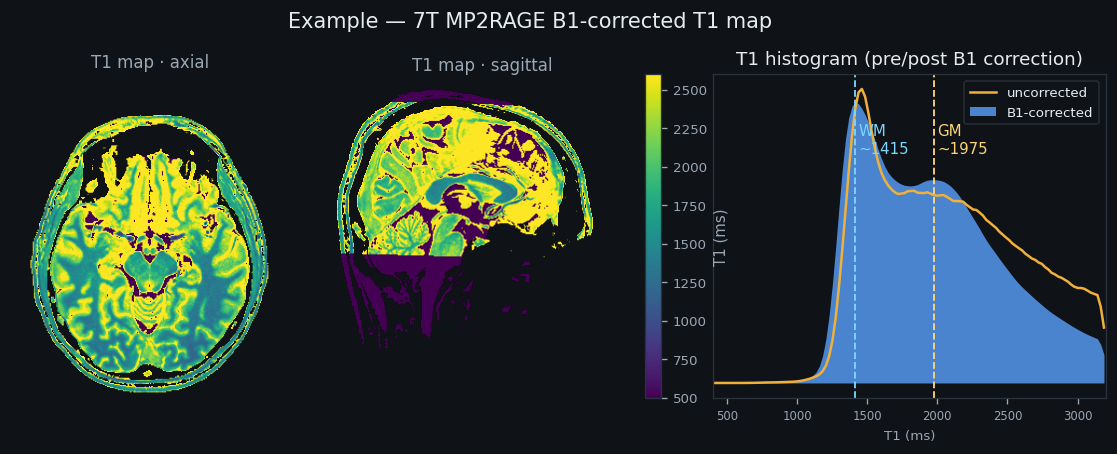
Outputs. Depending on the task: a B1-corrected T1 map (ms) and the uncorrected T1, a relative B1 map, a denoised UNI-DEN, the B1-corrected UNI, and a parameters.json. The result panel overlays a pre/post (uncorrected vs corrected) T1 histogram; download each as NIfTI (plus a derived DICOM T1 series), or grab them all at once as a single .zip.

Privacy. Everything you load and all image processing runs inside this browser tab via WebAssembly. Your images, DICOM/NIfTI files and results are never uploaded to any server, and the tool keeps working with the network disconnected. The page does load Google Analytics, which reports anonymous usage (page views and interactions) to the NeuroDesk team so they can see how many people use the tool. It never has access to your images or results, only that a visit happened. (If you use the folder picker, Chrome shows an “upload… only continue if you trust this site” prompt. That is Chrome’s wording for granting the page read access to a folder on your disk, not a network upload. Drag & drop skips it.)

How to use. (1) Drop your NIfTI files or DICOM folders and tag their roles. (2) Confirm the sequence parameters, from JSON sidecars, DICOM headers, or a 7T/3T preset. (3) Pick a task (T1 map, SA2RAGE → B1 map, or UNI denoising) and Compute, then preview and download. A T1 map needs the UNI, INV2 (brain mask) and a B1 source (2-volume SA2RAGE or a B1 map); denoising needs UNI + INV1 + INV2.

Batch (BIDS). Switch the input toggle to BIDS directory and pick a dataset root. The app lists every subject and session, matches the MP2RAGE and fmap files by their BIDS entities, and flags anything missing or non-standard. Run each session with its Calculate button (parameters come from that session's JSON sidecars), download the map from its row, then Download and unload to free the memory before the next subject. Only one session is held in memory at a time.

Research software, provided as-is with no warranty. Sanity-check the maps and confirm the parameters against your protocol. Cite Marques 2010 (NeuroImage), Marques & Gruetter 2013 (PLoS ONE), Eggenschwiler 2012 (MRM).

Example T1 map i

Example: UNI, B1-corrected T1 map, B1 map, and T1 histogram

1Load your data i

Drag & drop your DICOM folders, drop several at once, or .nii / .nii.gz files here. (Click to browse for NIfTI files.)
UNI, INV2, and either a SA2RAGE (2-vol) or a B1 map. DICOM headers auto-fill roles & parameters; .json sidecars do the same for NIfTI. Drag & drop is the best way to add several series at once, and it never shows a browser “upload” prompt. Your images are never uploaded, all processing runs in this tab.
Fallback if drag & drop won’t work. Picks one folder at a time (or a parent folder containing several series). Chrome shows an “upload” permission prompt for folders, that is just its wording for letting the page read the folder; your folder’s contents are never sent anywhere. Drag & drop avoids the prompt.

2Sequence parameters i

Preset: defaults

MP2RAGE

SA2RAGE i

3Run i

Add inputs to enable.

Result i

Rust → WebAssembly · runs in your browser · source · Python port of Marques' scripts

Developed by Thomas B Shaw
Based on Ashley Stewart's QSMbly